 中文
Browser & desktop automation
Connect web interactions, desktop applications and file operations without repetitive manual handoffs.
- Browser and desktop element picking
- Ordered locator strategies
- Stop when the target cannot be identified reliably
QBotRPA · AI-powered automation
Describe the task. Review the workflow. Put it to work. QBotRPA combines visual automation with AI-assisted generation, diagnosis and controlled recovery across browser, desktop and data workflows.
Built for the work between systems
Keep your business systems in place. Bring their repetitive steps into a workflow that business teams can understand, specialists can maintain and IT can oversee.
Connect web interactions, desktop applications and file operations without repetitive manual handoffs.
Make steps, branches and loops visible. Build workflows that can be inspected, tested and reused.
Launch and schedule tasks, then follow outcomes through node traces, logs and optional recordings.
From instructions to inspectable workflows
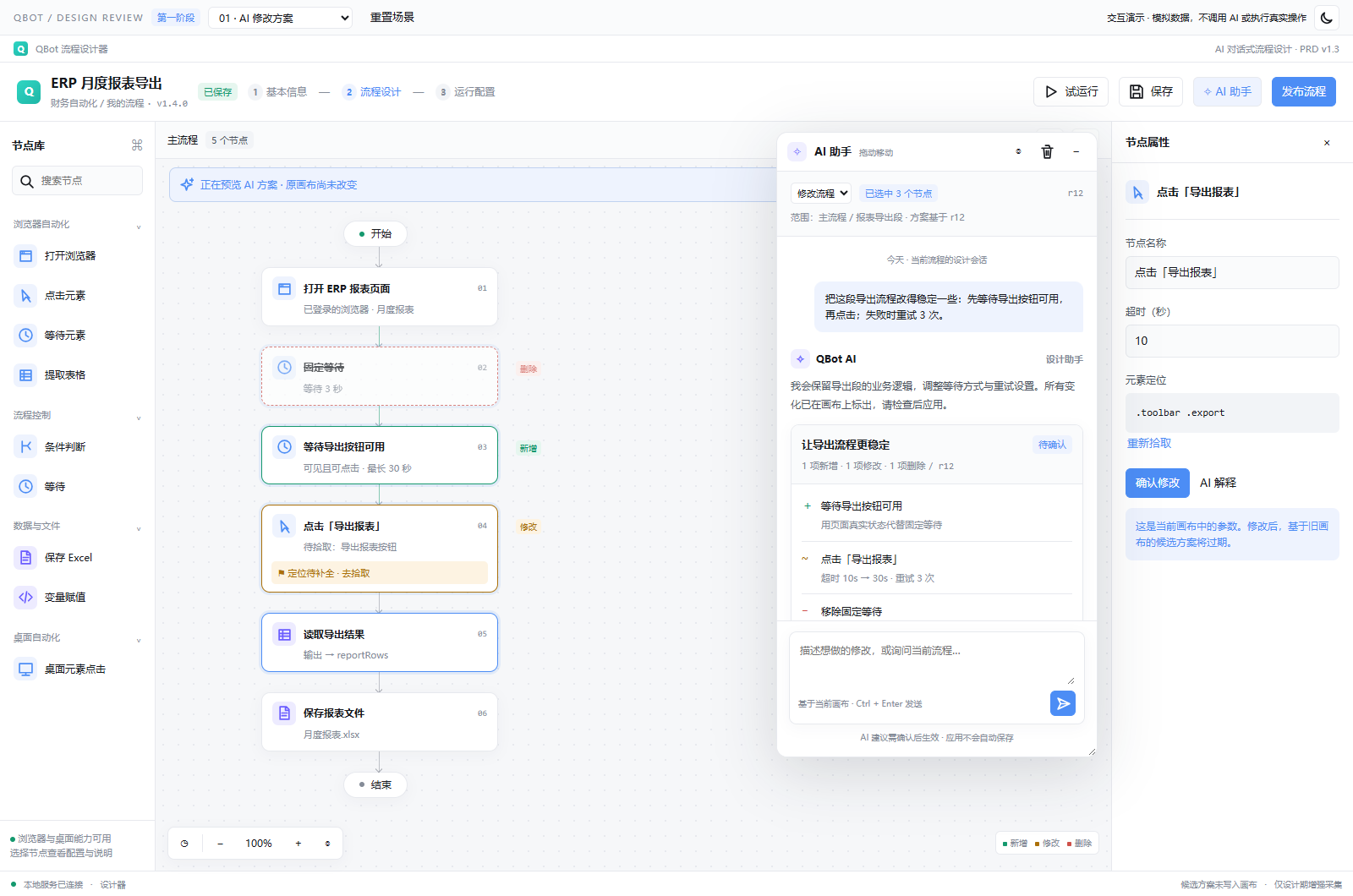
From a natural-language brief to a workflow draft, targeted edits and failure analysis, AI becomes part of the design process. The important part is not simply generating steps: it is understanding and validating them before execution.
Explain this export flow. Where might it fail?Illustrative interaction with preset examples. No model calls or real workflow execution.
Explanation does not change the workflow.
Define the goal, inputs, outputs and permitted actions.
Inspect changes and complete locators and dependencies. A draft is not a production release.
Validate in a test environment and explicitly confirm actions with business side effects.
Use the established save and release process, with traceable change boundaries.
Adapt with control
Page changes, loading delays or broken locators can interrupt stable workflows. AI uses execution context and available evidence to help diagnose the issue, propose a recovery path and attempt recovery within an authorized policy.
The goal is less repetitive troubleshooting, not fewer business controls. When evidence is insufficient, the target is ambiguous or the outcome is uncertain, stop and hand over to a person.
An operating workspace, not a collection of scripts
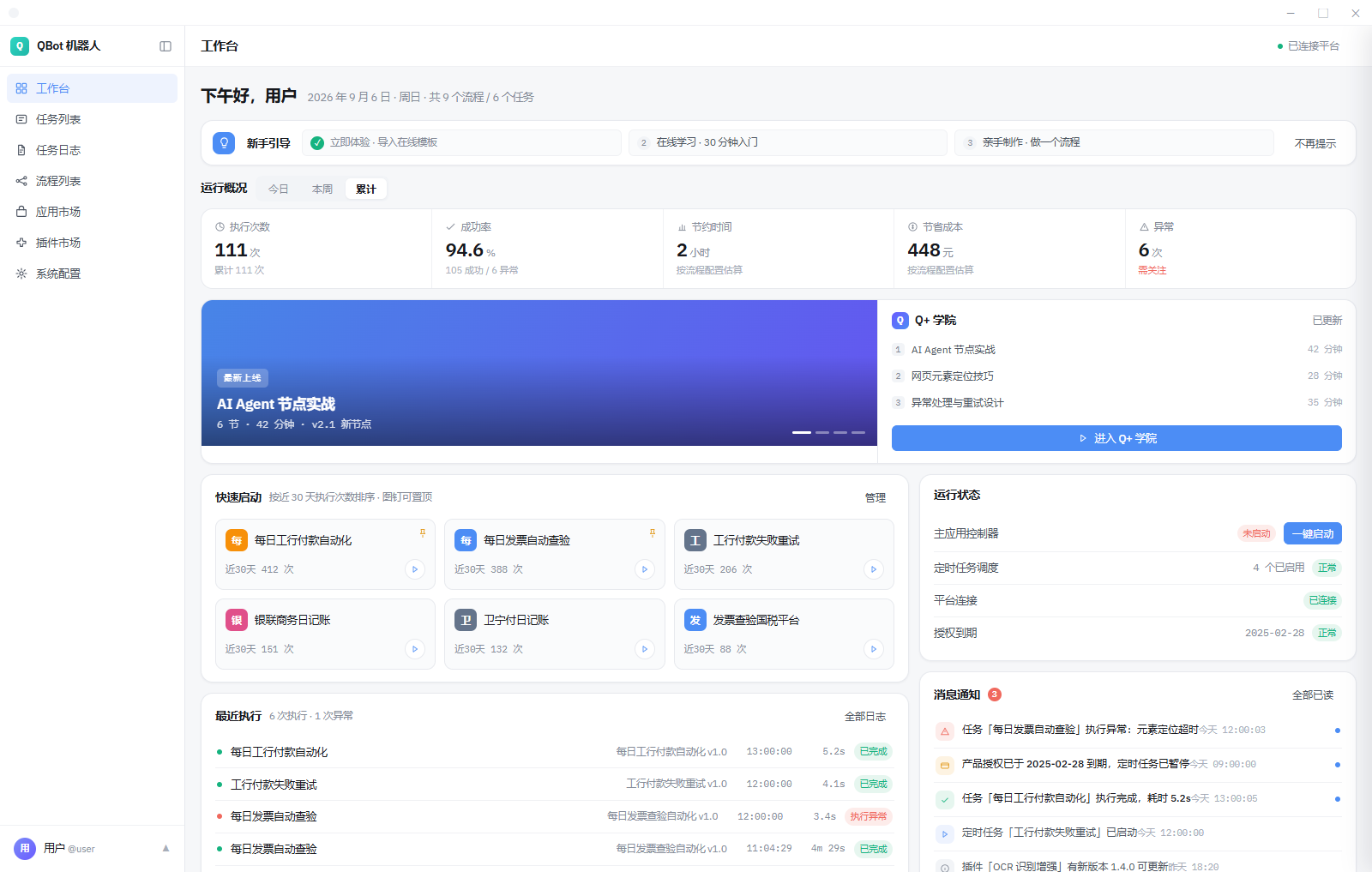
See frequently used workflows, recent runs, exceptions and runtime status in one workspace. Move beyond building automation to understanding what it does each day and what needs attention.
Start with one useful workflow
These illustrative scenarios are adapted to your systems, fields and permissions. Establish one reliable workflow before expanding into cross-team coordination.
Collect store and ERP reports, organize order, stock and fulfillment data, and route exceptions for review.
Collect statements and transaction records, match by rules and surface discrepancies. AI helps interpret unstructured material; people confirm important amounts and accounting decisions.
Schedule file preparation, report updates and result distribution. Automate routine steps while retaining human ownership of exceptions and decisions.
QBotRPA + NovaPilot
QBotRPA focuses on executable, manageable automation. NovaPilot brings together AI applications, digital workers, data and business collaboration. Together they connect analysis and recommendations to permissioned, traceable execution.
Interpret material, extract information, generate content and prepare inputs for the next step.
Operate browsers, desktop applications and files through defined steps, returning status and available evidence.
Coordinate tasks around role-specific goals, follow exceptions and hand over decisions that require people.
A few things worth knowing
Generated workflows are proposals for review. Check nodes, locators, inputs, credentials and scope, then test before saving and publishing. Actions with business side effects still require explicit authorization.
No. AI can help with some environmental changes and failures, but cannot guarantee an understanding of every business rule. Major system changes, complex permissions, duplicate-action risks and uncertain outcomes still need human maintenance.
No. Keep rules and deterministic nodes for stable operations. Add AI where understanding, generation or diagnosis is useful. Model availability is distinct from ordinary visual editing and established execution capabilities.
Visit the download page and check the installer’s supported system. Contact the team to confirm trial activation, runtime requirements and a first scenario. Start with redacted samples and test accounts.
Bring a repetitive task. Together, we will define the inputs, steps, exceptions and acceptance criteria.